
Appearance
示例
概述
本页面提供完整的端到端Apps SDK示例,特别是展示多个UI component和工具的"Pizzaz"演示应用。所有示例都位于GitHub上的OpenAI Apps SDK Examples仓库中。
MCP源代码
以下是演示如何注册多个工具和资源的TypeScript服务器示例。此服务器为Pizzaz应用的所有component提供基础。
typescript
import { McpServer } from "@modelcontextprotocol/sdk/server/mcp.js";
import { z } from "zod";
import { readFileSync } from "node:fs";

const server = new McpServer({
  name: "pizzaz-server",
  version: "1.0.0",
});

// 加载编译的component bundle
const MAP_JS = readFileSync("web/dist/map.js", "utf8");
const CAROUSEL_JS = readFileSync("web/dist/carousel.js", "utf8");
const LIST_JS = readFileSync("web/dist/list.js", "utf8");
const VIDEO_JS = readFileSync("web/dist/video.js", "utf8");

// 注册地图component资源
server.registerResource(
  "pizzaz-map",
  "ui://widget/pizzaz-map.html",
  {},
  async () => ({
    contents: [
      {
        uri: "ui://widget/pizzaz-map.html",
        mimeType: "text/html+skybridge",
        text: `
          <div id="map-root"></div>
          <script type="module">${MAP_JS}</script>
        `.trim(),
      },
    ],
  })
);

// 注册轮播component资源
server.registerResource(
  "pizzaz-carousel",
  "ui://widget/pizzaz-carousel.html",
  {},
  async () => ({
    contents: [
      {
        uri: "ui://widget/pizzaz-carousel.html",
        mimeType: "text/html+skybridge",
        text: `
          <div id="carousel-root"></div>
          <script type="module">${CAROUSEL_JS}</script>
        `.trim(),
      },
    ],
  })
);

// 注册列表component资源
server.registerResource(
  "pizzaz-list",
  "ui://widget/pizzaz-list.html",
  {},
  async () => ({
    contents: [
      {
        uri: "ui://widget/pizzaz-list.html",
        mimeType: "text/html+skybridge",
        text: `
          <div id="list-root"></div>
          <script type="module">${LIST_JS}</script>
        `.trim(),
      },
    ],
  })
);

// 注册视频component资源
server.registerResource(
  "pizzaz-video",
  "ui://widget/pizzaz-video.html",
  {},
  async () => ({
    contents: [
      {
        uri: "ui://widget/pizzaz-video.html",
        mimeType: "text/html+skybridge",
        text: `
          <div id="video-root"></div>
          <script type="module">${VIDEO_JS}</script>
        `.trim(),
      },
    ],
  })
);

// 地图工具
server.registerTool(
  "show-map",
  {
    title: "显示地图",
    _meta: {
      "openai/outputTemplate": "ui://widget/pizzaz-map.html",
      "openai/componentToolAccess": true,
    },
    inputSchema: { locations: z.array(z.object({ name: z.string(), lat: z.number(), lng: z.number() })) },
  },
  async ({ locations }) => {
    return {
      content: [{ type: "text", text: `在地图上显示了 ${locations.length} 个位置` }],
      structuredContent: { locations },
    };
  }
);

// 轮播工具
server.registerTool(
  "show-carousel",
  {
    title: "显示轮播",
    _meta: {
      "openai/outputTemplate": "ui://widget/pizzaz-carousel.html",
    },
    inputSchema: { images: z.array(z.object({ url: z.string(), caption: z.string() })) },
  },
  async ({ images }) => {
    return {
      content: [{ type: "text", text: `轮播包含 ${images.length} 张图片` }],
      structuredContent: { images },
    };
  }
);

// 列表工具
server.registerTool(
  "show-list",
  {
    title: "显示列表",
    _meta: {
      "openai/outputTemplate": "ui://widget/pizzaz-list.html",
    },
    inputSchema: { items: z.array(z.object({ id: z.string(), title: z.string(), description: z.string() })) },
  },
  async ({ items }) => {
    return {
      content: [{ type: "text", text: `列表包含 ${items.length} 个项目` }],
      structuredContent: { items },
    };
  }
);

// 视频工具
server.registerTool(
  "show-video",
  {
    title: "显示视频",
    _meta: {
      "openai/outputTemplate": "ui://widget/pizzaz-video.html",
    },
    inputSchema: { videoUrl: z.string(), title: z.string() },
  },
  async ({ videoUrl, title }) => {
    return {
      content: [{ type: "text", text: `播放视频: ${title}` }],
      structuredContent: { videoUrl, title },
    };
  }
);Pizzaz地图源代码
React + Mapbox客户端component,具有标记交互、检查器路由和全屏处理功能。
tsx
import React from "react";
import ReactDOM from "react-dom/client";
import mapboxgl from "mapbox-gl";
import "mapbox-gl/dist/mapbox-gl.css";
import { useOpenAiGlobal } from "./hooks/useOpenAiGlobal";

mapboxgl.accessToken = "your-mapbox-token";

function MapComponent() {
  const toolOutput = useOpenAiGlobal("toolOutput");
  const displayMode = useOpenAiGlobal("displayMode");
  const mapContainer = React.useRef<HTMLDivElement>(null);
  const map = React.useRef<mapboxgl.Map | null>(null);

  const locations = toolOutput?.structuredContent?.locations || [];

  React.useEffect(() => {
    if (!mapContainer.current || map.current) return;

    map.current = new mapboxgl.Map({
      container: mapContainer.current,
      style: "mapbox://styles/mapbox/streets-v12",
      center: [locations[0]?.lng || -74.5, locations[0]?.lat || 40],
      zoom: 9,
    });

    locations.forEach((loc: any) => {
      new mapboxgl.Marker()
        .setLngLat([loc.lng, loc.lat])
        .setPopup(new mapboxgl.Popup().setHTML(`<h3>${loc.name}</h3>`))
        .addTo(map.current!);
    });
  }, [locations]);

  React.useEffect(() => {
    if (map.current) {
      map.current.resize();
    }
  }, [displayMode]);

  return (
    <div style={{ width: "100%", height: "100%" }}>
      <div ref={mapContainer} style={{ width: "100%", height: "100%" }} />
    </div>
  );
}

const root = ReactDOM.createRoot(document.getElementById("map-root")!);
root.render(<MapComponent />);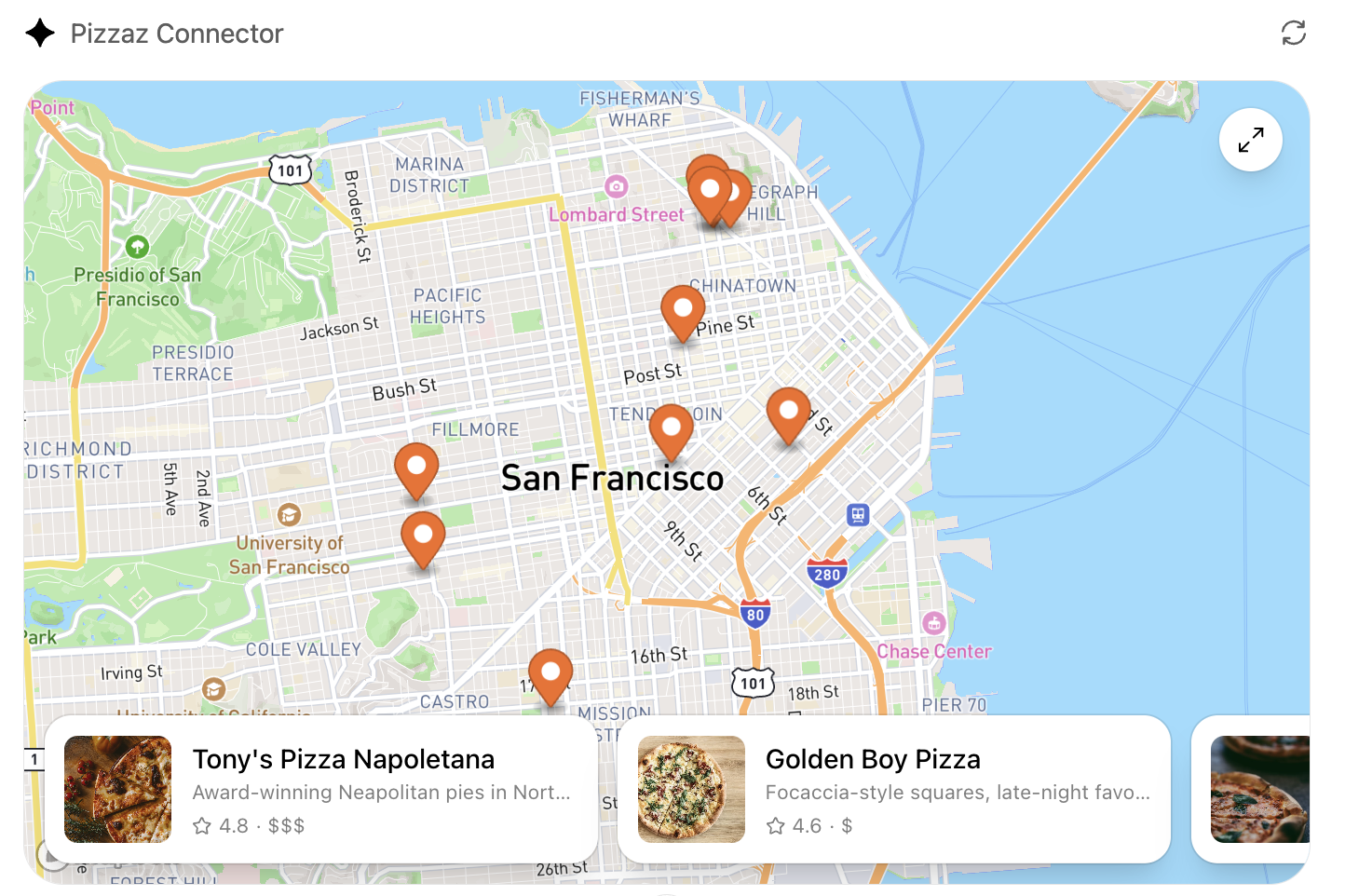
Pizzaz轮播源代码
使用embla-carousel实现触摸友好滚动的轻量级画廊视图。演示了无需服务器往返的响应式UI。
tsx
import React from "react";
import ReactDOM from "react-dom/client";
import useEmblaCarousel from "embla-carousel-react";
import { useOpenAiGlobal } from "./hooks/useOpenAiGlobal";

function CarouselComponent() {
  const toolOutput = useOpenAiGlobal("toolOutput");
  const [emblaRef, emblaApi] = useEmblaCarousel({ loop: true });

  const images = toolOutput?.structuredContent?.images || [];

  return (
    <div className="embla" ref={emblaRef}>
      <div className="embla__container">
        {images.map((img: any, idx: number) => (
          <div className="embla__slide" key={idx}>
            <img src={img.url} alt={img.caption} />
            <p>{img.caption}</p>
          </div>
        ))}
      </div>
      <button onClick={() => emblaApi?.scrollPrev()}>上一个</button>
      <button onClick={() => emblaApi?.scrollNext()}>下一个</button>
    </div>
  );
}

const root = ReactDOM.createRoot(document.getElementById("carousel-root")!);
root.render(<CarouselComponent />);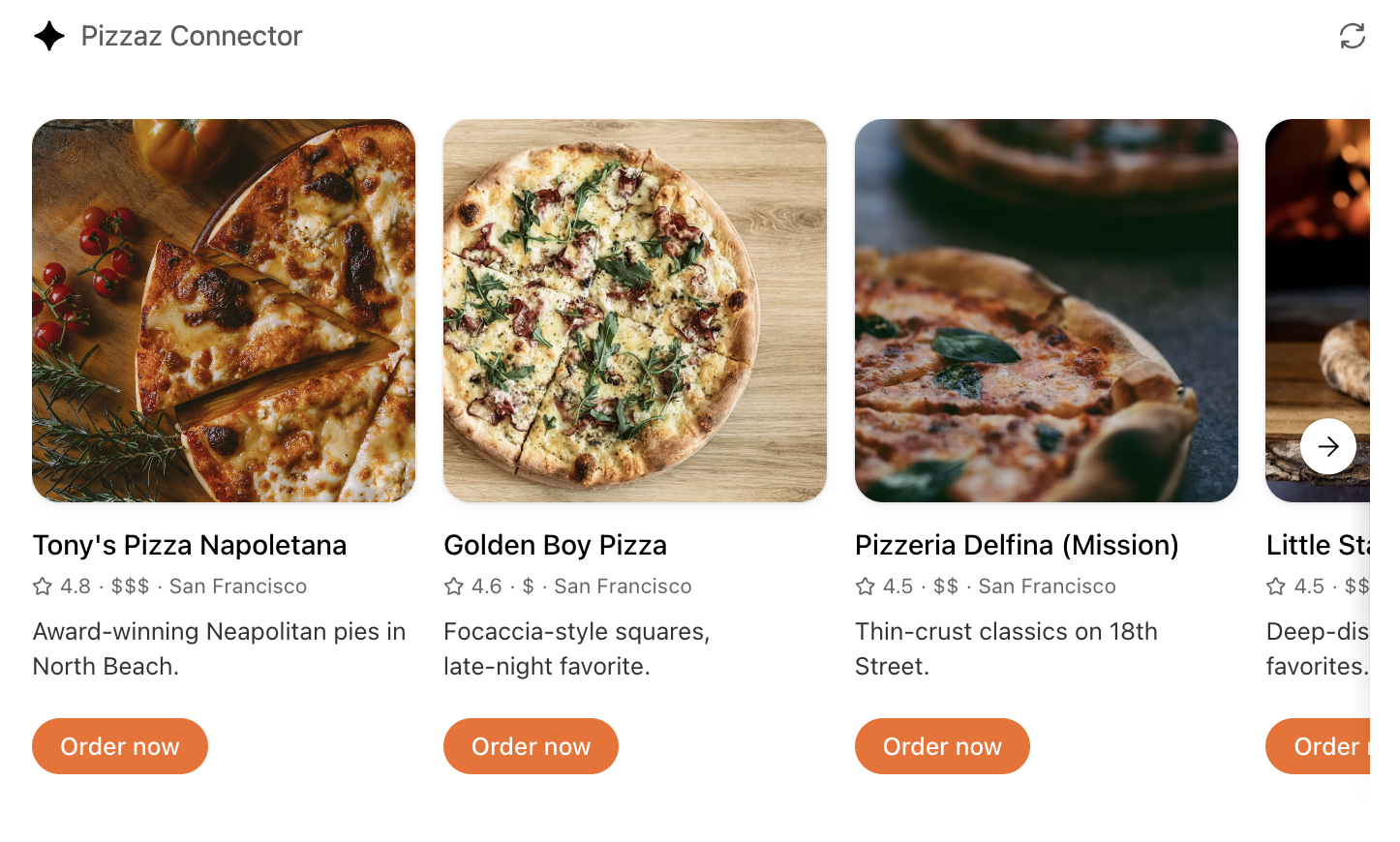
Pizzaz列表源代码
聊天发起的行程的列表布局。平衡了英雄摘要和可滚动排名,展示了密集的信息层次结构。
tsx
import React from "react";
import ReactDOM from "react-dom/client";
import { useOpenAiGlobal } from "./hooks/useOpenAiGlobal";

function ListComponent() {
  const toolOutput = useOpenAiGlobal("toolOutput");
  const [selectedId, setSelectedId] = React.useState<string | null>(null);

  const items = toolOutput?.structuredContent?.items || [];
  const selectedItem = items.find((item: any) => item.id === selectedId);

  return (
    <div style={{ display: "flex", height: "100%" }}>
      <div style={{ flex: 1, overflowY: "auto", borderRight: "1px solid #ccc" }}>
        {items.map((item: any) => (
          <div
            key={item.id}
            onClick={() => setSelectedId(item.id)}
            style={{
              padding: "16px",
              cursor: "pointer",
              backgroundColor: selectedId === item.id ? "#f0f0f0" : "white",
            }}
          >
            <h3>{item.title}</h3>
            <p>{item.description}</p>
          </div>
        ))}
      </div>
      <div style={{ flex: 1, padding: "16px" }}>
        {selectedItem ? (
          <div>
            <h2>{selectedItem.title}</h2>
            <p>{selectedItem.description}</p>
          </div>
        ) : (
          <p>选择一个项目以查看详细信息</p>
        )}
      </div>
    </div>
  );
}

const root = ReactDOM.createRoot(document.getElementById("list-root")!);
root.render(<ListComponent />);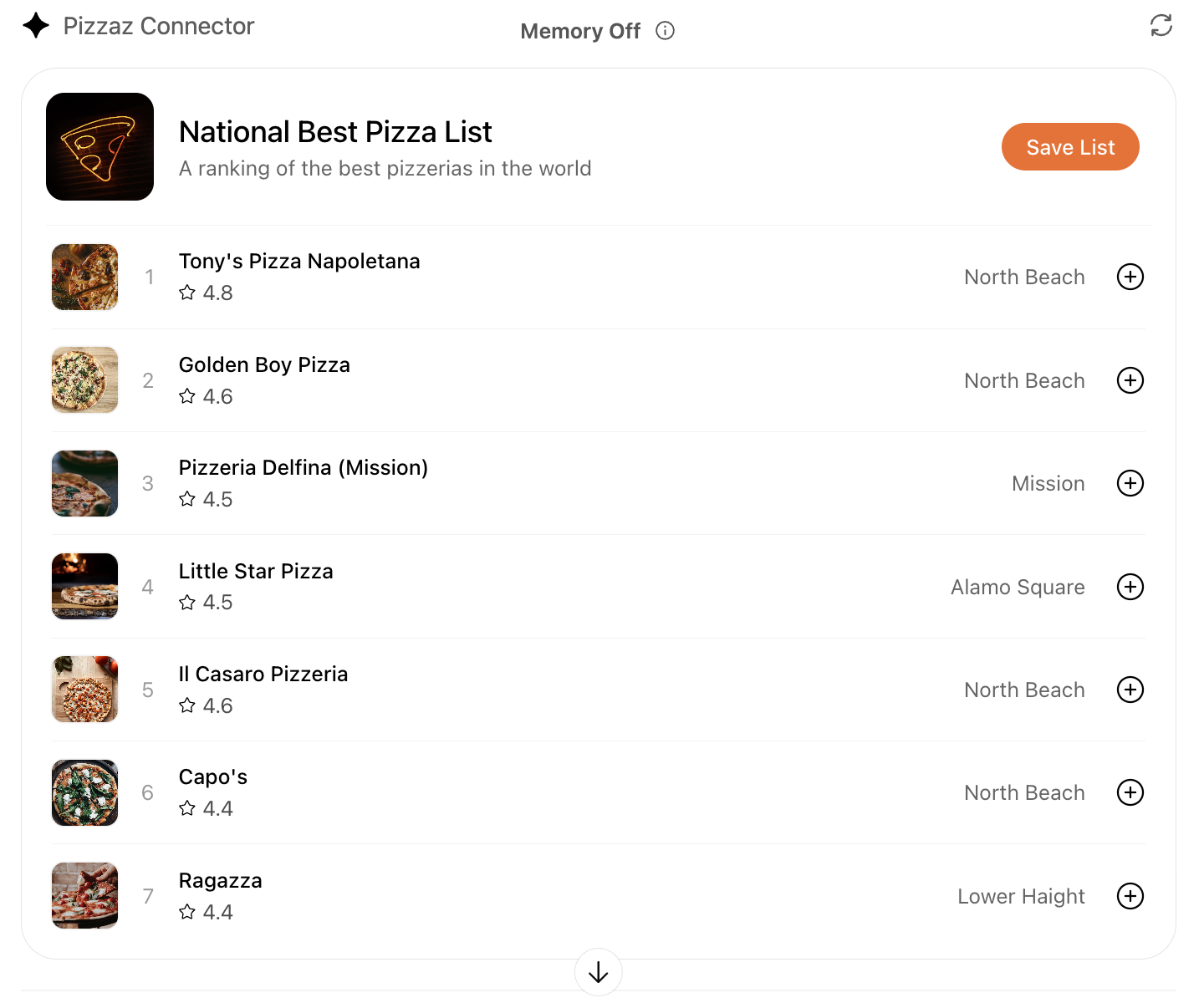
Pizzaz视频源代码
具有播放跟踪、覆盖控件和全屏更改反应的视频component。
tsx
import React from "react";
import ReactDOM from "react-dom/client";
import { useOpenAiGlobal } from "./hooks/useOpenAiGlobal";

function VideoComponent() {
  const toolOutput = useOpenAiGlobal("toolOutput");
  const displayMode = useOpenAiGlobal("displayMode");
  const videoRef = React.useRef<HTMLVideoElement>(null);

  const videoUrl = toolOutput?.structuredContent?.videoUrl;
  const title = toolOutput?.structuredContent?.title;

  React.useEffect(() => {
    if (displayMode === "fullscreen" && videoRef.current) {
      videoRef.current.requestFullscreen();
    }
  }, [displayMode]);

  return (
    <div style={{ width: "100%", height: "100%", position: "relative" }}>
      <video ref={videoRef} src={videoUrl} controls style={{ width: "100%", height: "100%" }} />
      <div style={{ position: "absolute", top: 0, left: 0, padding: "8px", background: "rgba(0,0,0,0.5)", color: "white" }}>
        <h3>{title}</h3>
      </div>
    </div>
  );
}

const root = ReactDOM.createRoot(document.getElementById("video-root")!);
root.render(<VideoComponent />);关键技术
这些示例展示了:
- MCP服务器 – 使用TypeScript SDK注册工具和资源
- React Component – 使用钩子和状态管理的现代React模式
- 第三方集成 – Mapbox用于地图,embla-carousel用于轮播
- 响应式设计 – 适应不同显示模式的component(inline、pip、fullscreen)
- 状态同步 – 使用
window.openaiAPI与ChatGPT宿主通信
运行示例
要在本地运行Pizzaz演示:
- 克隆OpenAI Apps SDK Examples仓库
- 安装依赖项:
npm install - 构建component:
npm run build - 启动MCP服务器:
npm start - 使用MCP Inspector测试:
http://localhost:3000/mcp
自定义示例
你可以使用这些示例作为自己应用的起点:
- 地图 – 将Mapbox替换为Google Maps或OpenStreetMap
- 轮播 – 添加自动播放、缩略图或视频支持
- 列表 – 实现排序、过滤或分页
- 视频 – 添加播放列表、字幕或自定义控件
后续步骤
通过这些示例,你拥有了构建丰富交互式Apps SDK应用所需的所有构建块。浏览部署指南以学习如何将你的应用投入生产,或查看MCP服务器、自定义UX、身份验证和存储页面以深入了解特定主题。