
Appearance
规划设计模式
点击上方图片可观看原课程视频。
引言
本节聚焦于规划类智能体,帮助你:
- 明确总体目标,并将复杂任务拆分为可执行的子任务;
- 利用结构化输出提升结果的可读性与可编排性;
- 应对动态事件或意外输入,构建可迭代的规划流程。
学习目标
完成本节后,你将理解如何:
- 为智能体设定清晰的总体目标,使其明确“要达到什么效果”;
- 将复杂任务拆解为有序的子任务,并按逻辑顺序组织;
- 配备合适的工具(检索、分析等),决定调用时机并处理突发状况;
- 评估子任务结果、度量表现,并在必要时调整计划以优化最终输出。
明确目标并拆解任务
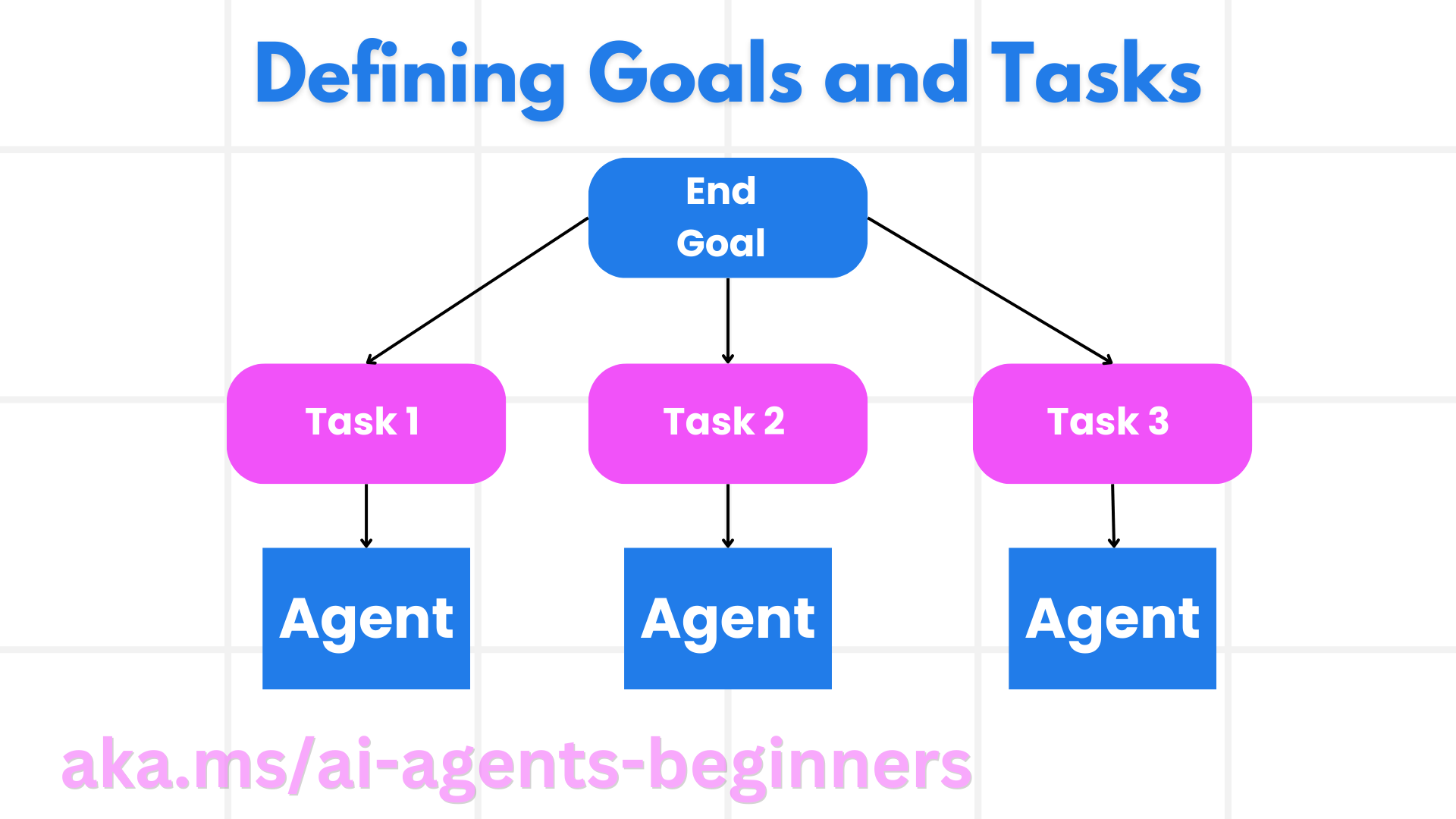
现实任务往往过于复杂,无法一步到位完成。智能体需要一个精炼的目标来指导规划。例如:
“生成一份 3 天的旅行行程。”
虽然一句话即可概括,但仍需进一步细化,比如是否包含航班、酒店、活动安排等。目标越清晰,智能体与协作人员就越容易对准期望结果。
任务分解
将大型或复杂任务拆解为更小的子目标,可以显著提升可执行性。以上述旅行行程为例,可拆为:
- 机票预订
- 酒店预订
- 租车安排
- 个性化偏好
每个子任务都可以交由专门的智能体或流程处理:有的负责筛选最优航班,有的聚焦酒店,有的给出本地活动建议。最终由协调智能体汇总成一份完整行程。
这种模块化方式还能方便扩展。例如后续可新增“美食推荐”“当地活动建议”等专职智能体,逐步提升行程质量。
结构化输出
LLM 可以输出 JSON 等结构化格式,便于下游智能体或服务解析。在多智能体场景中,规划结果越结构化,后续执行越顺畅。以下示例演示了如何让规划智能体生成结构化计划:
python
from pydantic import BaseModel
from enum import Enum
from typing import List, Optional, Union
import json
import os
from typing import Optional
from pprint import pprint
from autogen_core.models import UserMessage, SystemMessage, AssistantMessage
from autogen_ext.models.azure import AzureAIChatCompletionClient
from azure.core.credentials import AzureKeyCredential

class AgentEnum(str, Enum):
    FlightBooking = "flight_booking"
    HotelBooking = "hotel_booking"
    CarRental = "car_rental"
    ActivitiesBooking = "activities_booking"
    DestinationInfo = "destination_info"
    DefaultAgent = "default_agent"
    GroupChatManager = "group_chat_manager"

class TravelSubTask(BaseModel):
    task_details: str
    assigned_agent: AgentEnum

class TravelPlan(BaseModel):
    main_task: str
    subtasks: List[TravelSubTask]
    is_greeting: bool

client = AzureAIChatCompletionClient(
    model="gpt-4o-mini",
    endpoint="https://models.inference.ai.azure.com",
    credential=AzureKeyCredential(os.environ["GITHUB_TOKEN"]),
    model_info={
        "json_output": False,
        "function_calling": True,
        "vision": True,
        "family": "unknown",
    },
)

messages = [
    SystemMessage(content="""You are an planner agent.
    Your job is to decide which agents to run based on the user's request.
                      Provide your response in JSON format with the following structure:
{'main_task': 'Plan a family trip from Singapore to Melbourne.',
 'subtasks': [{'assigned_agent': 'flight_booking',
               'task_details': 'Book round-trip flights from Singapore to '
                               'Melbourne.'}
    Below are the available agents specialised in different tasks:
    - FlightBooking: For booking flights and providing flight information
    - HotelBooking: For booking hotels and providing hotel information
    - CarRental: For booking cars and providing car rental information
    - ActivitiesBooking: For booking activities and providing activity information
    - DestinationInfo: For providing information about destinations
    - DefaultAgent: For handling general requests""", source="system"),
    UserMessage(
        content="Create a travel plan for a family of 2 kids from Singapore to Melboune", source="user"),
]

response = await client.create(messages=messages, extra_create_args={"response_format": 'json_object'})

response_content: Optional[str] = response.content if isinstance(
    response.content, str) else None
if response_content is None:
    raise ValueError("Response content is not a valid JSON string" )

pprint(json.loads(response_content))多智能体编排下的规划智能体
在多智能体系统中,规划器充当“调度员”。例如:
- 接收用户请求(如“帮我规划酒店”);
- 依据系统提示和智能体注册表,生成结构化计划;
- 根据子任务数量,决定是单独把请求转交给某个智能体,还是由群聊管理器协调多人协作;
- 收集各子任务结果并进行总结。
下面的代码展示了这一流程:
python
from pydantic import BaseModel

from enum import Enum
from typing import List, Optional, Union

class AgentEnum(str, Enum):
    FlightBooking = "flight_booking"
    HotelBooking = "hotel_booking"
    CarRental = "car_rental"
    ActivitiesBooking = "activities_booking"
    DestinationInfo = "destination_info"
    DefaultAgent = "default_agent"
    GroupChatManager = "group_chat_manager"

class TravelSubTask(BaseModel):
    task_details: str
    assigned_agent: AgentEnum

class TravelPlan(BaseModel):
    main_task: str
    subtasks: List[TravelSubTask]
    is_greeting: bool
import json
import os
from typing import Optional

from autogen_core.models import UserMessage, SystemMessage, AssistantMessage
from autogen_ext.models.openai import AzureOpenAIChatCompletionClient

client = AzureOpenAIChatCompletionClient(
    azure_deployment=os.getenv("AZURE_OPENAI_DEPLOYMENT_NAME"),
    model=os.getenv("AZURE_OPENAI_DEPLOYMENT_NAME"),
    api_version=os.getenv("AZURE_OPENAI_API_VERSION"),
    azure_endpoint=os.getenv("AZURE_OPENAI_ENDPOINT"),
    api_key=os.getenv("AZURE_OPENAI_API_KEY"),
)

from pprint import pprint

messages = [
    SystemMessage(content="""You are an planner agent.
    Your job is to decide which agents to run based on the user's request.
    Below are the available agents specialized in different tasks:
    - FlightBooking: For booking flights and providing flight information
    - HotelBooking: For booking hotels and providing hotel information
    - CarRental: For booking cars and providing car rental information
    - ActivitiesBooking: For booking activities and providing activity information
    - DestinationInfo: For providing information about destinations
    - DefaultAgent: For handling general requests""", source="system"),
    UserMessage(content="Create a travel plan for a family of 2 kids from Singapore to Melbourne", source="user"),
]

response = await client.create(messages=messages, extra_create_args={"response_format": TravelPlan})

response_content: Optional[str] = response.content if isinstance(response.content, str) else None
if response_content is None:
    raise ValueError("Response content is not a valid JSON string")

pprint(json.loads(response_content))输出示例:
json
{
    "is_greeting": "False",
    "main_task": "Plan a family trip from Singapore to Melbourne.",
    "subtasks": [
        {
            "assigned_agent": "flight_booking",
            "task_details": "Book round-trip flights from Singapore to Melbourne."
        },
        {
            "assigned_agent": "hotel_booking",
            "task_details": "Find family-friendly hotels in Melbourne."
        },
        {
            "assigned_agent": "car_rental",
            "task_details": "Arrange a car rental suitable for a family of four in Melbourne."
        },
        {
            "assigned_agent": "activities_booking",
            "task_details": "List family-friendly activities in Melbourne."
        },
        {
            "assigned_agent": "destination_info",
            "task_details": "Provide information about Melbourne as a travel destination."
        }
    ]
}完整示例 notebook 可参考项目中的 07-autogen.ipynb。
迭代式规划
有些任务需要动态调整:某个子任务的结果可能影响后续步骤,或用户在过程中给出新偏好。例如发现航班数据格式异常时,规划器需要先修正航班方案,再继续酒店预订;又或者用户临时要求改成更早的航班,规划器就要重新计算部分子任务。
python
from autogen_core.models import UserMessage, SystemMessage, AssistantMessage

messages = [
    SystemMessage(content="""You are a planner agent to optimize the
    Your job is to decide which agents to run based on the user's request.
    Below are the available agents specialized in different tasks:
    - FlightBooking: For booking flights and providing flight information
    - HotelBooking: For booking hotels and providing hotel information
    - CarRental: For booking cars and providing car rental information
    - ActivitiesBooking: For booking activities and providing activity information
    - DestinationInfo: For providing information about destinations
    - DefaultAgent: For handling general requests""", source="system"),
    UserMessage(content="Create a travel plan for a family of 2 kids from Singapore to Melbourne", source="user"),
    AssistantMessage(content=f"Previous travel plan - {TravelPlan}", source="assistant")
]
# .. re-plan and send the tasks to respective agents若需更复杂的规划与多智能体协作,可参阅微软研究团队的 Magentic One 方案。
小结
本节示例展示了如何创建一个规划器,基于可用智能体自动拆解任务、分配执行者,并协调输出。当智能体具备所需工具后,还可以进一步组合“反思”“总结”“轮询协作”等模式,打造更灵活的工作流。
延伸资源
- AutoGen Magentic One —— 通用多智能体系统,实现任务规划、执行跟踪与重新规划。